Here I will write about articles I read and found interesting.📝
How To Edit Your Videos Faster (And Save Time For Netflix)
Hey! I’m a creative who loved finding clever ways to get work done. Today, I want to share my experiences editing videos for social media or just for fun. this is about saving time so you can watch Squid Game instead of trimming videos forever.
The boring editor
Let me paint you a picture. before I started using this process, here’s how editing videos went:
- Add your video to the editor timeline.
- Start cutting it up to keep the good stuff.
- Then, you need to find the perfect background music, sound effects, or B-roll.
Now, here’s the annoying part. picking the right sound effect or B-roll takes forever. You’d have to drop the entire audio or video file into your editor, start trimming again, delete the useless parts, and finally keep the part you need. It’s like repeating the whole steps again x 3.
Maximize your time
I had to say “Enough” and find a solution, I already had a tool that’s like a library of sounds and music where you can quickly trim music and sound affects and use them, it was perfect but it doesn’t accepts any other files because it’s a sound affect library not a file management tool so I though why there isn’t something similar but for other files, it’s when I found eagle but it didn’t have a quick way to trim videos and audios, it’s as well when I though, why not make it? eagle allows me to create plugins and can use them super fast so I made a video and audio trimmer plugin where you can just cut what you need and drag-and-drop it straight into your favorite editor.
Imagine this: picking your B-roll or sound effect, already trimmed to the perfect length, in no time. Boom! Job done. Now you can spend that extra time watching Squid Game or whatever else Netflix throws at you.
Oh, and guess what? This plugin has over 500 downloads in a week! (Yeah, I’m bragging a little. Let me have this.)
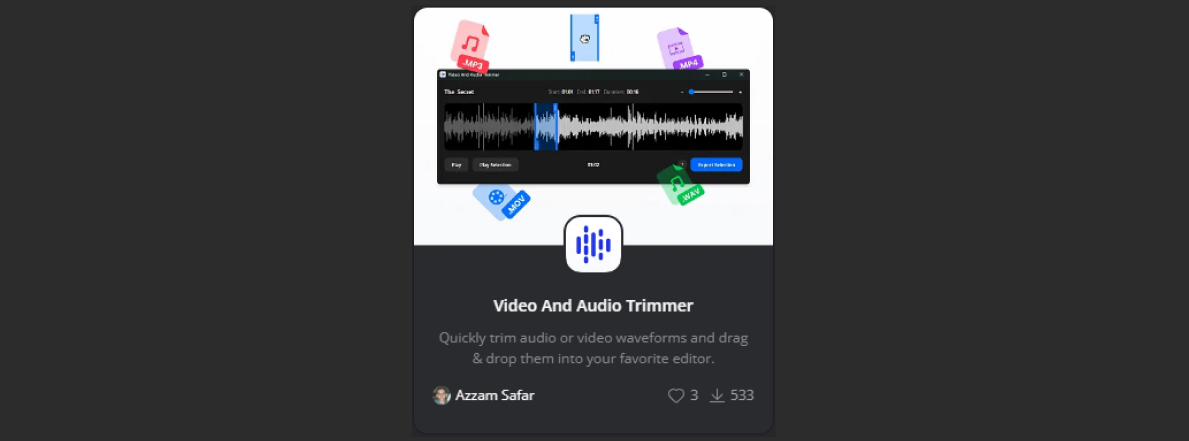
You can grab the plugin in the https://eagle.cool/ app. If you don’t know what Eagle is, well, you’re probably as unproductive as I used to be ;)
Eagle: My File Management Savior
Before I discovered Eagle, my files were a disaster. Seriously, they were scattered all over the place with no organization whatsoever. Every time I needed a file, I had to search by name (and pray I’d named it something logical not just a dot or three letters because I’m lazy). Worst of all, there was no quick preview so I had to open each file to make sure it’s what I wanted.
The amount of time I wasted searching for files? Let’s just say I could’ve finished two seasons of Squid Game.
But after I used https://eagle.cool/, it’s a game-changer, NO JOKE, I can:
- Organize files of all types in a single place, and if the type isn’t supported you can create a plugin to support it.
- Preview files instantly without opening them, HELPS A LOT, when trying to find specific audio or a video or an image.
- Add tags, folders, and even color-code my files for ultimate organization, when I need specific file I just find it, it’s MAGIC.
Honestly, Eagle is so good that I even store random JavaScript code snippets there. (But that’s a story for another day.)
Final Thoughts
If you’re tired of wasting time on file management or video editing, I highly recommend checking out https://eagle.cool/. It’s a lifesaver, and you’ll thank me later when you have extra time to binge-watch your favorite shows.
References
- The Eagle App: https://eagle.cool/
- Video and Audio Trimmer Plugin: https://community-en.eagle.cool/plugin/7a938d93-895a-4b48-b65b-23da9fda61c9
Painless Functional Specifications - Part 1 - Why bother
This is a functional specs describe the behavior of the entire system, User experience.
Not writing specs is an unnecessary risk you take in a software project, and not having a spec will always make you spend more time iterating, updating and creating low quality code.
Here’s why.
-
The most important function of a spec is to design the program. even if you are a single developer, the act of writing the spec - describing how the program works in minute detail - will force you to actually design the program step by step, that will help be to identify gaps and figure them out before coding.
-
Communication, when you write a spec, you only have to communicate how the program is supposed to work once. Everybody on the team can just read the spec, and it will be much easer to set deadlines when you know how large or small is the features by using the spec’s.
References
Painless Functional Specifications - Part 1 By Joel Spoksky
Painless Functional Specifications - Part 2 - What’s a Spec
People get these mixed up, Functional specifications and technical specifications
- A functional specification describes how a product will work entirely from the user’s perspective. it doesn’t care how the thing implemented.
- A technical specification describes the internal implementation of the program. it talks about data structures and database models, etc.
Functional specifications
Here is some examples of what it looks like
- Overview:
- Each spec should have, Start date, an author, a status if it’s not complete or completed.
- The spec is supposed to show the goals we are trying to achieve from the user prospective. The graphics and layout of the screens shown here merely to illustrate the underlying functionality. The actual look and feel will be developed over time with the input of designers and iterative user feedback. This spec does not discuss the algorithms, calculation, code, which will be discussed in the technical specifications. It simply discusses what the user sees when they interact with the tool.
- Scenarios:
- Show as much as you can of details DETAILS, DETAILS.
- These are imagination real life user stories of how actual people would use the tool.
- Scenario 1: Mike, and how is he going to use the app
- Scenario 2: Cindy, and how is she going to use the app with mike
- Going into the Scenario details helps to imagen how the app should work
- Non Goals:
- It shows what we are not going to implement, for example, This version 0.02 will not support the following features 1, 2, 3.
- Flowchart
- Sharing a diagram or a flowchart to visualize how does the big picture look like.
- Screen by screen specifications
- These are not the final design screens but a prototype quick version to illustrate how it will look like
- Explain each screen the the user flow through the whole tool.
- Open Issues
- A list of issues that we are not yet sure what is the solution for it, that we need to come back to it to fix or remove before marking this as completed.
- References
- A list of the resources used to make this functional specifications
Specs Need To Stay Alive
Specs should be updated frequently. the updating continues as the product is developed and new decisions are made, the spec is completed when the code is complete
References
Painless Functional Specifications - Part 2 By Joel Spolsky
Painless Functional Specifications – Part 3 - But.. How
In Microsoft they realized that when you add more programmers to a late project, it gets even later. that’s because when you have n programmers on a team, the number of communication paths is n(n-1)/2 , which grows at O(n2).
 So to fix this issue we need to achieve a grow rate at O(n), where Charles Simonyi suggested the concept of master programmers, the idea was that one master programmer would be responsible for writing all the code, but he would rely on a team of junior programmers to implement his writings, this was supposed to solve the issue by making it O(n) instead of O(n2) but this didn’t fully fix the issue because, a master programmer might simplify some communication, but as the team grows, the master becomes a bottleneck and communications between team members grows which doesn’t scale linearly. so they rethought about this idea and just adding more smart people to the team which made a team of 50 people more productive than a team of 25 people but not as twice as productive, so now for each program manager there is 5 programmers which makes the communication growth is locked on O(n/5), for example for 10 developers it will be O(10/5) = O(2), now it grows more linearly.
Painless Functional Specifications – Part 4 - Tips
Specs are good, but not if nobody reads them. As a spec-writer, you have to trick people into reading your stuff.
Rules to be a good writer
- Be Funny
- Yep, rule number one in tricking people into reading your spec is to make the experience enjoyable.
- Just be careful on where should you be funny, it shouldn’t be everywhere
- Writing a spec is like writing code for a brain to execute
- Instead of writing code for the compiler to read, write it for a logical brain to read.
- Include technical notes or side notes for specifications.
- Humans don’t want to decode something to understand it they just want to read it.
- Write as simple as possible
- Don’t make your readers feel stupid, make sure they know what the key words you used mean so they feel like they understand.
- When writing ask yourself if the person reading this sentence will understand it at a deep level?
- Use simple language and stay away from formal language
- Break things down to short sentences.
- Avoid walls of text, people get scared of a paper full of text.
- Use numbered or bulleted lists, pictures, charts, tables, and lots of whitespace
- Review and reread several time
- If you can’t understand your specs after reading it make sure to rewrite it in a simpler way.
- Templates considered harmful
- It’s not important that every spec look the same.
- Don’t use glossary ideas should be simplified.
- Templates scares people away from writing.
References
Painless Functional Specifications - Part 4 By Joel Spolsky
Projects life cycle example
Every new issue will be labeled as triage This issue may need triage. Remove it if it has been sufficiently triaged.
To do the initial triage and remove the triage label, the following conditions should be fulfilled/considered. It’s okay if not all of these are always considered. Treat this non-exhaustive list as a guideline, not a hard checklist:
-
The issue should make sense, that is, it should present a problem.
- For example, if an issue isn’t clear or has no goal; the issue should be closed
-
Check if this issue is a duplicate of earlier-reported issues.
- If you are certain this is a duplicate, close this issue as a duplicate of the earlier issue. Make sure this is obvious in the backlink of the earlier issue, or explicitly link to the duplicate issue.
- If you are not sure, you can still leave a comment to indicate the other issue is possibly a duplicate, similar, or related.
-
Add appropriate labels.
-
S-*: The status of an issue.S-needs-repro: Status: This issue has no reproduction and needs a reproduction to make progress.S-blocked: Status: Blocked on something else such as an RFC or other implementation work.S-waiting-on-review: Status: Awaiting review from the assignee but also interested parties.S-tracking-forever: Status: Never to be closed.
-
P-*: Priority labels.P-critical: Critical priority.P-low: Low priority.P-medium: Medium priority.P-high: High priority.
-
No type: Issues with no type
-
Bug: An unexpected problem or behavior.
-
Feature Request: A request, idea, or new functionality.
-
Tracking Issue: A tracking issue for an RFC or an unstable feature.
-
Cleanup: PRs that clean code up or issues documenting cleanup.
-
Discussion: Discussion or questions that doesn’t represent real issues.
-
Enhancement: An issue proposing an enhancement or a PR with one.
then it can go for a “final-comment-period” In the final comment period and will be labeled as (merge, postpone, close) soon unless new substantive objections are raised.
disposition-merge: This issue / PR is in FCP with a disposition to merge it.
or
go for “disposition-close” This PR / issue is in FCP with a disposition to close it.
or
goes for “disposition-postpone” This issue / PR is in FCP with a disposition to postpone it.
Notes from varies different companies
Rule #1 is: Write them in whatever form makes the most sense for the particular project.
what non-goals are. Note, that non-goals aren’t negated goals like “The system shouldn’t crash”, but rather things that could reasonably be goals, but are explicitly chosen not to be goals. A good example would be “ACID compliance”
Design docs should be sufficiently detailed but short enough to actually be read by busy people.
Road map for full year inside it there is quarter plans
Think about bots, changelog management, and releases management design briefs in design, success plans in sales)
talk about writing culture and quality writing
You MAY use RFC2119-style MUST, SHOULD and MAY language to help clarify your intentions.
When your RFC is ready to be commented on, mark you PR as “Ready for review”
adding “-Authors: /Owner: [TBD: your name]” to the meta data
Don’t get bogged down trying to make a document perfect before sharing it—just make it good enough to convey your point. It’s important to have co-workers help guide the process.
Six-week cycles
First, we work in six-week cycles. Six weeks is long enough to build something meaningful start-to-finish and short enough that everyone can feel the deadline looming from the start, so they use the time wisely. The majority of our new features are built and released in one six-week cycle. 2 weeks cool down
non-goals: are impoaten
we should draw protoypes and breadboards: https://basecamp.com/shapeup/1.3-chapter-04 | https://sep.com/blog/breadboarding-a-simple-way-to-prototype/
about bug managemnt when it comes to the 6 week fouces time https://notes.nicolevanderhoeven.com/Fork+My+Brain and maybe dedicate a whole cycle to fixing bugs “bug smash”
on cycles we need to be laser focesed
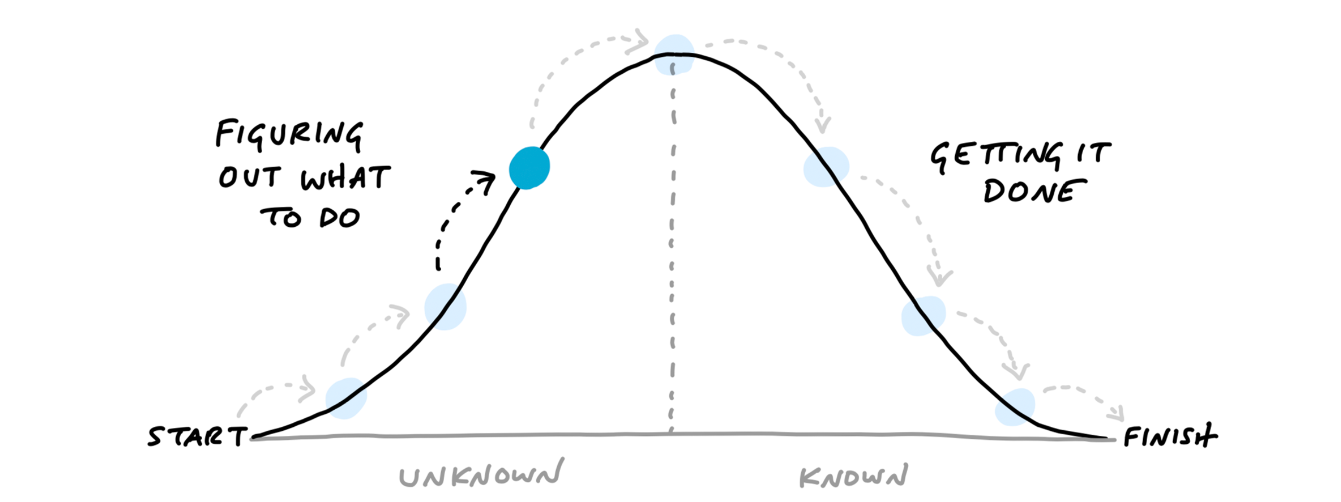
What “Shape Up” Recommates Instead:
-
Betting on Projects, Not Roadmaps:
Every 6 weeks, stakeholders (leaders, product managers, etc.) “bet” on a small set of projects that fit the company’s appetite (time budget) and strategic goals. No long-term commitments—only the next cycle matters. -
Fixed Time, Variable Scope:
Instead of planning what to build over months, teams define how much time they’re willing to spend (e.g., 2 weeks vs. 6 weeks). Projects are shaped to fit this appetite, ensuring they’re manageable and focused. -
No Backlogs:
Ideas that don’t get bet on are archived. If they’re important, they’ll resurface naturally in future cycles. This avoids the “zombie tasks” that haunt traditional roadmaps. -
Dynamic Prioritization:
Each cycle starts fresh. Teams only work on what’s been explicitly chosen, avoiding the distraction of theoretical future work
The Joel Test
The neat thing about the Joel Test is that it’s easy to get a quick “yes” or “no” to each question. You don’t have to figure out lines-of-code or anything else just give 1 point for each “yes”
Score
- 12 is perfect
- 11 is tolerable
- 10 or lower, you’ve got serious problems.
The truth is that most software organizations are running with score of 2 or 3, and they need serious help, because companies like Microsoft run at 12 full-time.
Questions
- Do you use source control?
- Programmers have no way to know what other people did. mistakes can’t be rolled back easily, without a source control.
- Can you make a build in one step?
- The process should take one step to ship a build from the latest source snapshot.
- Do you make daily builds?
- When using source control, make sure to run build before and after to make sure you code didn’t break the build.
- Do you have a bug database?
- Keep track of bugs not in your brain but in GitHub.
- **Do you fix bugs before writing new code?
- Fix bugs before writing new code.
- Do you have an up-to-date schedule?
- Have some deadlines for when the code will be done.
- Do you have a spec?
- Write RFC or Design docs
- Do programmers have quiet working conditions?
- Getting in the flow mood is important and a quiet working space is way to get into the flow.
- Do you use the best tools money can buy?
- Use tools, Devices, Environments Products to code better and faster, even if it costs money.
- Do you have testers?
- Using modern type-safe practices, and doing small tests after code minimizes the need for doing complete test.
- Do new candidates write code during their interview?
- Testing programmers before hiring is important.
- Do you do hallway usability testing?
- Test the user experience of your app with five or six people is enough to give you an idea about the biggest usability problems in your code.
Reference
Here I will write about books I read and found interesting.📚
Discourses And Selected Writings - Penguin Classics - Epictetus
-
Al-Kindi ‘Encyclopaedic Scholar of the Baghdad “House of Wisdom’ (according to the Muslim historian Ibn al-Nadim (d. 955), ‘the best man of his time, called The Philosopher of the Arabs’)
-
Our emotional responses to upsetting actions – not the actions themselves – are what create anxiety and depression; and that a point basic to Stoic psychology in general
-
Page 25
How to solve it
- Page 16
Rhetoric: Thank You For Arguing
-
Set Your Personal Goal
Set your goals for your audience. Ask yourself: Do you want to change their mood, their mind, or their willingness to carry out what you want? -
Build a Persona
-
Develop an imaginary character that represents your audience. When writing or speaking, talk as if you are addressing that character directly. This helps you tailor your message effectively.
-
When researching an audience, note the key terms and values they emphasize. Create messages that align with those values subtly.
-
-
Tense and Its Effects Use these to set up titles and themes for your videos
- Blame (Past): Was the CEO responsible for the company’s bankruptcy?
- Values (Present): Is it important to be wealthy to live a fulfilling life?
- Choice (Future): Should we offer free public transportation to reduce traffic?
Value beats blame, and blame beats choice—until you steer the conversation toward choices that solve a problem to everyone’s advantage. When discussing choices, make sure your argument turns to the future.
Argument Tools: Ethos, Logos, and Pathos To Build Up the Story
Logos: Argument by Logic
- Definition:
Logos is the logical appeal. If arguments were children, logos would be the brainy one, getting top grades in high school. - Techniques:
- Concession: Use your opponent’s argument to your advantage.
- Examples of Logic:
- Deduction: Apply a general principle to a particular case.
- Enthymeme: A “logic sandwich” where you state, “We should choice, because commonplace.”
If-Then Syllogism
Another form of logical reasoning is the if-then syllogism:
If most men aged twenty-five to forty read “lad” magazines, and
If ads in these magazines sell lots of cars,
Then we should advertise the Priapic in lad mags.
That’s formal logic. Start with something true, follow it with another truth, and you reach a conclusion that also must be true.
Ethos: Argument by Character
- Definition:
Ethos relies on the persuader’s character, reputation, and trustworthiness. A sterling reputation is persuasive. - Techniques:
- Show that you share your audience’s values.
- Use personal anecdotes that highlight your reliability.
- Remember: “A person’s life persuades better than his word.”
Pathos: Argument by Emotion
- Definition:
Pathos appeals to emotion. It forms the root of “sympathy.” - Techniques:
-
Sympathy: Show genuine concern for your audience’s feelings.
-
Storytelling: Use personal or relatable stories to create a virtual experience for your audience.
-
Emotional Volume Control: Underplay or gradually increase your emotional tone to guide the audience’s feelings.
-
Humor: Laughter is a powerful calming device and can enhance your persuasiveness when used properly.
Some points I saw from Matt Rife:- Acts and makes the viewer visualize the moment
- He will change his voice
- Mimic another personality
- Acts deeply, DEEPLY
- He gives an age, style, and lets you really imagine the person in the story
- Makes some unexpected twists
- Adds some adult jokes
- Fakes stories to make people laugh
- Over-exaggerates the story
- Relatable
- He puts the jokes on himself so people laugh at him
- Acts and makes the viewer visualize the moment
-
Additional Rhetorical Tactics
- Hypophora:
Ask a rhetorical question and then answer it immediately (e.g., “Good idea? I believe it was.”). This anticipates and nips audience skepticism in the bud. - The Reluctant Conclusion:
Act as though you reached your conclusion only because of overwhelming evidence, even if you were eager to prove your point. - Dubitatio:
Appear to be in doubt about what to say. The plain-spoken, seemingly ingenuous speaker is often the most believable. - Personal Sacrifice:
Claim that the choice will help your audience more than it will help you, even to the point of suffering from the decision. - Extreme Choice Framing:
Propose an extreme option first to make the one you want seem more reasonable.
Tragedy:
Is a representation of a meaningful and complete action, expressed in artistic language, performed rather than narrated. It should evoke pity and fear in the audience
The Six Elements of Tragedy
- Plot (structure of events)
- Character (moral qualities of protagonists)
- Diction (language and expression)
- Thought (themes and messages)
- Spectacle (visual elements)
- Song (musical and rhythmic aspects)
The Structure of a Good Plot
- The beginning should not follow from anything else by necessity but should initiate the sequence of events.
- The middle follows naturally from the beginning.
- The end follows logically from the middle and concludes the action.
The Best Type of Tragic Plot
- A great tragedy should have a complex plot, meaning it should include reversals of fortune (Peripeteia) and recognition (Anagnorisis). The story should make the audience feel pity and fear, which leads to catharsis.
The Importance of Probability in Storytelling
- It is better for a story to include extraordinary events that seem believable than to have mundane events that seem unlikely. The audience must accept what happens as logically plausible within the story’s world.
Here I will write about business ideas and best practices.💼
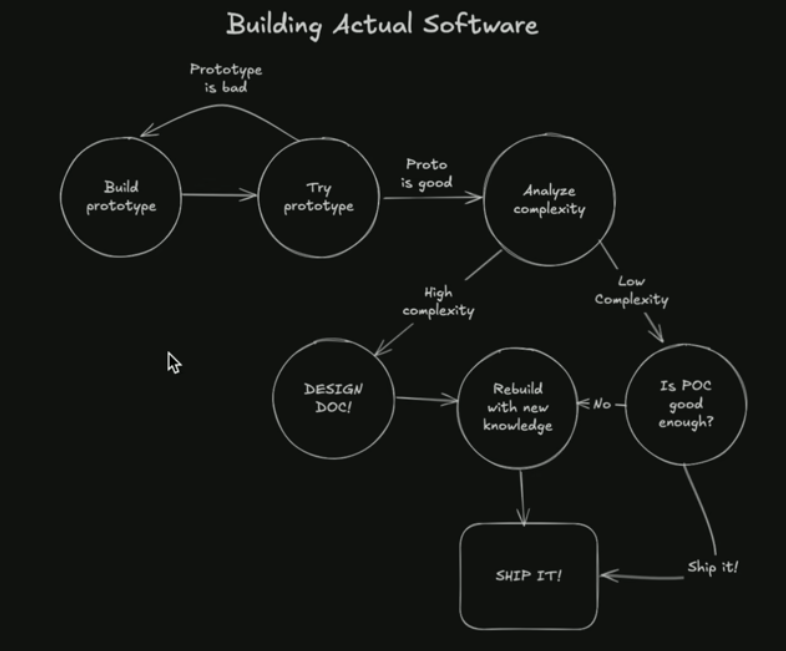
This is from a theo video, where he was talking about his experience and I do agree with what is he saying so I wanted to share it here
References
Email Setup Guide with Cloudflare & Resend
This guide walks you through setting up a professional email address (yourname@swarlet.com) using Cloudflare Email Routing and Resend. Emails sent to this address will forward to your personal Gmail, and you’ll be able to send emails from yourname@swarlet.com using Resend’s SMTP service.
The setup
- Create a Gmail Account
- Use the naming format:
yourname.swarlet@gmail.com(replaceyournamewith your actual name). - Why? This acts as your “inbox” for forwarded emails from
yourname@swarlet.com.
- Use the naming format:
Step 1: Request Cloudflare-Routed Email
- Contact the Swarlet Team
- Ask them to create a Cloudflare-routed email address for you.
- Provide them with:
- The forwarding Gmail address or email you have created (
yourname.swarlet@gmail.com).
- The forwarding Gmail address or email you have created (
- What Happens Next?
- The team will configure
yourname@swarlet.comto automatically forward emails to your Gmail. - and they will create the resend API key and share the API key and the STMP data with you
- The team will configure
Step 2: Configure Gmail or any other mail provider to Send / receive Emails
In this example we will implement it using Gmail but the steps should be similar on other providers
- Add Your Cloudflare Email to Gmail
- Log in to
yourname.swarlet@gmail.com. - Go to Settings → Accounts and Import → Send mail as → Add another email address.
- Log in to
- Enter Email Details
- Name: Your full name (e.g., Jane Doe).
- Email: Your Cloudflare email
yourname@swarlet.com - Treat as an alias (keep checked)
- Click Next Step
- Configure SMTP Settings
- In the Next form the SMTP server, fill in:
SMTP Server: [Provided by Resend]
Port: 587
Username: [Provided by Resend]
Password: [Your Resend API Key]
TLS: Enable (keep checked)
Click Add Account.
- In the Next form the SMTP server, fill in:
- Verify Ownership
- Gmail will send a verification code/link to
yourname@swarlet.com. - Check your Gmail inbox (
yourname.swarlet@gmail.com) for the forwarded code/link. - Enter/Click the code/link to complete setup.
- Gmail will send a verification code/link to
Step 3: Add a Profile Image to Your Email
- Create a Google Account for Your Professional Email
- Go to accounts.google.com.
- Click Create account → For myself.
- When prompted for a Gmail address, select Use my current email address instead.
- Enter
yourname@swarlet.com
- Verify Email Ownership
- Google will send a verification email to
yourname@swarlet.com. - Check your
yourname.swarlet@gmail.cominbox for the forwarded verification link. - Click the link to confirm ownership.
- Google will send a verification email to
- Upload Profile Image
- After verification, go to your google account and with this email
yourname@swarlet.com. - Navigate to Personal info → Profile → Profile photo.
- Upload your desired image, this image will be used for your email and everything else.
- After verification, go to your google account and with this email
Important Notes
- Sending Emails: When sending emails from Gmail, always select
yourname@swarlet.comas the “From” address, you can make this the default as well from the mail as when we added the email.

- Receiving Emails: All emails to
yourname@swarlet.comwill appear inyourname.swarlet@gmail.comInbox. - When you sign up with team tools make sure to sign up with your Gmail account:
yourname.swarlet@gmail.comit acts like youryourname@swarlet.comand you will be able to sync Gmail events.
Now you can use your professional email normally, you will be able to send and receive emails from one inbox.
Starting A Startup
https://www.reddit.com/r/Entrepreneur/comments/s5arxb/comment/hsw79ad/?utm_source=share&utm_medium=web3x&utm_name=web3xcss&utm_term=1&utm_content=share_button
as shown in this reddit a lot for examples where people started with the wrong mindset ,made things for free and ended up out of business, it’s paid from day one, that’s a business not a charity
https://www.youtube.com/watch?v=jHyU54GhfGs You need to get feedback before writing code as simple formula is
As a: ………………. I need: ……………. So I can: …………… But give it as much texture as you can
for example
As a lazy cat owner I need *monthly food box so I can not leave the house
now you can list the customer journey from the start knowing nothing about you until they buy, for example.
- Decision (could be from and ad or a social media app and click the link)
- WTF? (How does it work and how much)
- What type are you, (in our example: what type of cat you got)
- Plan (in our example: do you want weekly monthly delivery or yearly)
- How big are you (In our example: big cat, indoor, organic, vegan)
- Shipping (what way we will ship the box)
- Create an account to confirm ( what is the ways to login/signup)
- Order confirm and support (what happens after ordering)
- Food box received (what to do after a customer received the order)
Now this flow was built on the as, I need, so I can, example. The goal now is to do the Minimum Viable Product. to do that we need to look at the flow and MINIMIZE IT
Here is three tools you can use
- 😡Sad face - (users hate this)
- 😀 Happy face - (users like this)
- 🪶 Brand - your brand benefits
let’s cut the flow, to make it simpler to let the user reach his goal of the Food box:
- Decision (could be from and ad or a social media app and click the link)
- 😀WTF? (How does it work and how much)
- 😡What kind are you, (in our example: what kind of cat you got)
- 🪶Plan (in our example: do you want weekly monthly delivery or yearly)
- 😀😡How big/type are you (In our example: big cat, indoor, organic, vegan)
- 😡Shipping (what way we will ship the box)
- 😡 Create an account to confirm ( what is the ways to login/signup)
- 😀Order confirm and support (what happens after ordering)
- 🪶😀Food box received (what to do after a customer received the order)
Now let’s clean this up, this clean up can be based on the feature or it’s in components, like a plan could have yearly, monthly weekly, and it’s not only monthly.
- Decision (could be from and ad or a social media app and click the link)
- WTF? (How does it work and how much)
- Plan (monthly)
- How big/type are you (now only vegan)
- Order confirm and support (what happens after ordering)
- Food box received (what to do after a customer received the order)
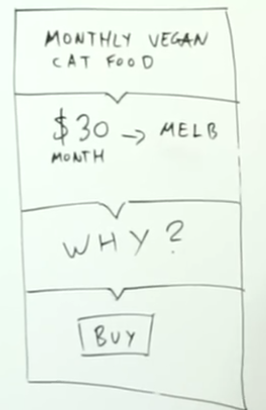
Now after removing all the fat from the idea and keeping only the things that are super necessary, so we went from a full thick 9 step process to 6 minimum process to reach the customer goal, so it will look like
If you want to test the business with no product you can, make this website and ask users to pay and run ads on a keyword and see if you got enough buyers if things look good you can refund to the users there money and let them know it’s coming soon. if not refund the money and close the idea.
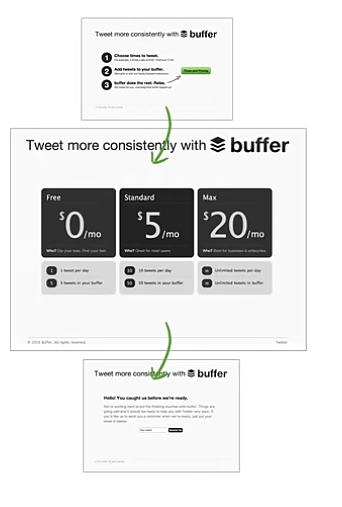
MVP examples
buffer
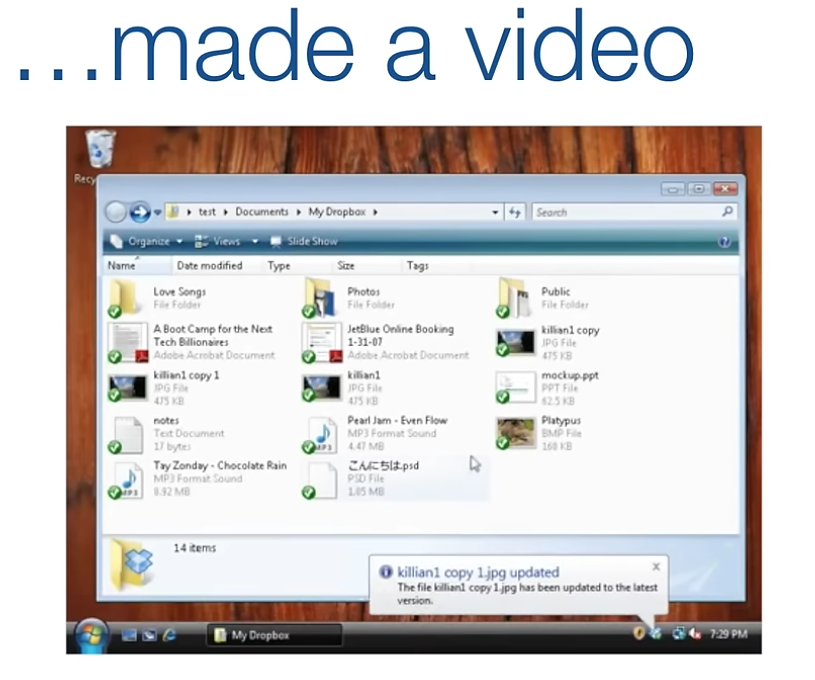
dropbox, made a video example, with a waiting a list
Zappos He went to a shoes store and took images of shoes and he was putting these images in a website and adding a buy button to it, whenever someone buys he deliver it for them
Start up business model
- Value propositions
- It’s not your idea or product, it’s about what pain or gain you are creating and who is your customer
- Customer segments
- Who are your customers and how is there persona look like
- Channels
- How to reach your customers to sell them
- Customer relationships
- How to get, keep, grow your customers
- Revenue Streams
- What is the value the customer is paying for and how is the customer is going to pay
- Resources
- What are the most important assets you need to make this business work
- Partners
- Who are the key partners and suppliers needed to make this business work
- Activities
- What is the key skills or activity you need to become good at to do this business
- Costs
- What is the cost and expenses to operate the entire business, and list them from important to least important and form highest to lowest
Starting a social media account before writing code and upload content about this niche and see if you get engagement and let users answer your questions

Quick hype business For a hype business do -> One feature apps with specific users. For a new business -> do a landing page and act like you have the product and sell, if you made enough sales then you can refund and build the product.
Long term business For long term business -> Social media start, content about the topic you want to sell. For existing business -> Social media start and build a community
Here I will write about books I read and found interesting.🏫
The grow mindset is the ability to grow your mind, the brain the is like a muscle and when you treat it, like a muscle you will start seeking challenging topics that makes your brain tired just like when you make your muscles tired at the gym, and then your brain starts to grow just like any other muscles
So struggles doesn’t mean the end, or you should stop or you only can seek help, but it means it’s the right path to grow your mind
Brain Exercises
You can learn anything and struggles is just part of learning
Reading and math helps to improve the visual sections of the brain Learning a new language strengthens the parts of the brain associated with thought, and action
Practicing an instrument improves the visual auditory and motor sections of the brain that allow your brain to send messages across the brain quickly
The more you improve these sections the less it will take to learn/master something new
How Does The Brain Grow
The brain is ultimately made out of neuroplasticity so the more neuro cells you get the smarter you will be
The best way to gain neuro cells isn’t to do the easy path but is to get into the harder path and challenging problems, the more you use your brain the more your brain will make neuro cells
The more neuro cells you have the easer for you to do things that you never even learned
Note: You can learn anything and failing is just another word for growing.
A large part of growing your brain is growing your body.
العقل السليم في الجسم السليم
Walking and exercises helps to increase your body health which help to make you smarter
How to differentiate between growth mindset and fixed mindset
-
The growth mindset is the belief that you can grow your brain and that your intelligence grows with effort.
-
A fixed mindset is the belief that you are born a certain way and cannot change.
SMART goals
S for specific. A goal should be linked to one activity, thought, or idea.
M for measurable. A goal should be something you can track and measure progress toward.
A for actionable. There should be clear tasks or actions you can take to make progress toward a goal.
R for realistic. A goal should be possible to achieve.
T for time-bound. A goal should fall within a specific time period.
How to write a great research paper
Process
Idea -> Write paper -> Do research
Benefits:
- Forces us to be clear, focused.
- Crystallizes what we don’t understand.
- Open the way to dialogue with others: reality check, critique and collaboration.
The goal
It’s to share the idea in a reusable way, by the paper alone they can repeat the same idea
Key points
- Your paper should have just one “ping”: one clear, sharp idea.
- You may not know exactly what the ping is when you start writing: but you must know when you finish.
- If you have lots of ideas, write a lot of papers.
Writing Mindset
I have the first page to convince the reader to read the rest of the page rather than I have a hooked reader that will read my whole page.
Tips
“List down the references, case studies and other content you used to support your paper”
“Don’t share dead-ends, save time for the reader by going to the point directly, unless there is a clear solution that didn’t work with you so you can share the why.”
References
How to Write a Great Research Paper by Simon Peyton Jones
School yourself
Reached Algebra: Multiplication and division first video
References
Here I will write about math and algorithms.🧮
example subdir
Here I will write about anything interesting I find.✨
Facts
A method to master anything, for example if you want to master social media you need to list all the facts not the opinetad stuff, just facts for example
start from the start
A fact is you are talking to a human
a fact is did people click the video or not
a fact if people left after clicking then there is a wrong
then write down a commone errors you could do in a video
error one click through rate is going down is not the video being bad because they didn’t see the video
etc
now you can go through these fact all over again
You will need to use math logic in these descions for example:
c = clickthrough rate r = video retention if r is down =/ c is bad c does not imply r c ≢ r
by also using the truth table
T T = T F = F T = F F =
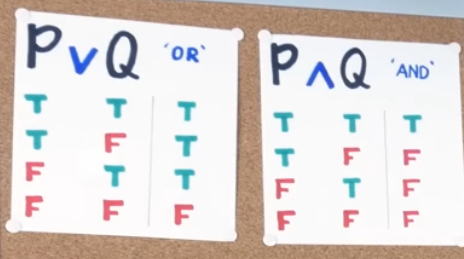
For example The way my teacher explained the implication and its truth table is as follows.
Suppose I say “If I win the lottery, I will buy you a house!” Logically, this is saying P => Q where P is “I win the lottery” and Q is “I buy you a house”.
Now think about the following: in which cases are you satisfied?
When P is true and Q is true, then I kept my promise and you’re happy. So T => T is T When P is true but Q is false, then I broke my promise. I won the lottery, but didn’t buy you a house. You’re angry, sad, dissapointed. So T => F is F When P is false, I haven’t really made any promises. I never said what I’d do if I did NOT win the lottery. So, if I still buy you a house, you’re definitely going to be happy, but even if I don’t, you won’t be mad because I didn’t win the lottery. Hence, F=>T and F=>F are both T.
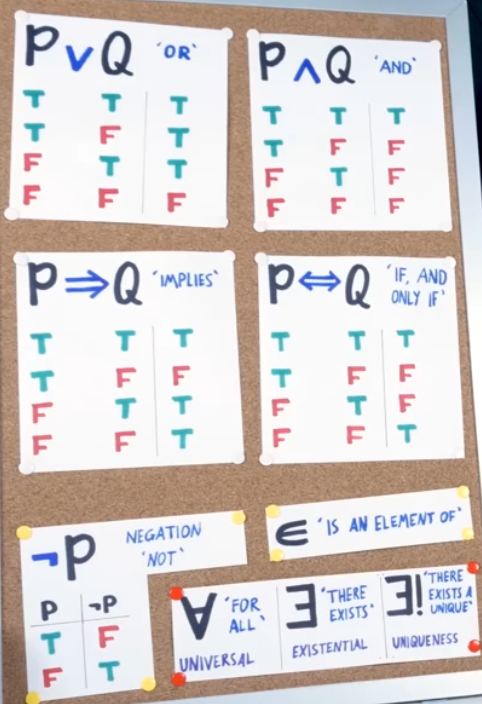
Logical Connectives
-
→ (Implication)
-
Meaning: “If-then” (if P, then Q).
-
Example: “If it rains (P), then the ground gets wet (Q).”
-
-
← (Converse Implication)
-
Meaning: “Is implied by” (Q ← P means “Q if P”).
-
Example: “The ground is wet (Q) ← it rained (P).”
-
-
↔ (Biconditional)
-
Meaning: “If and only if” (P ↔ Q means P and Q imply each other).
-
Example: “You get a discount ↔ you’re a member.”
-
-
∧ (AND)
-
Meaning: Both statements are true.
-
Example: “Access granted if (password correct ∧ face scan matches).”
-
-
∨ (OR)
-
Meaning: At least one statement is true.
-
Example: “Free shipping if (total ≥ $50 ∨ promo code applied).”
-
-
¬ (NOT)
-
Meaning: Negation.
-
Example: “¬(door open) → alarm triggers.”
-
-
⊕ (XOR)
-
Meaning: “Exclusive OR” (either P or Q, but not both).
-
Example: “A light switch: ON ⊕ OFF.”
-
Quantifiers
-
∀ (For All)
-
Meaning: Applies to every case.
-
Example: “∀ students, attendance is mandatory.”
-
-
∃ (There Exists)
-
Meaning: At least one case satisfies the condition.
-
Example: “∃ a user with admin privileges.”
-
-
∃! (There Exists Exactly One)
-
Meaning: Uniqueness.
-
Example: “∃! prime number that’s even (2).”
-
Set Theory & Membership
-
∈ (Element Of)
-
Meaning: Belongs to a set.
-
Example: “User123 ∈ admins.”
-
-
∉ (Not Element Of)
-
Meaning: Does not belong to a set.
-
Example: “Guest ∉ authorized_users.”
-
-
⫫ (Independent Of)
-
Meaning: No statistical relationship.
-
Example: “Coin flips ⫫ previous outcomes.”
-
Geometry & Relations
-
⊥ (Perpendicular/Contradiction)
-
Meaning:
-
Geometry: Perpendicular (e.g., line AB ⊥ line CD).
-
Logic: Contradiction (always false).
-
-
Example: “In a proof, assuming P ∧ ¬P leads to ⊥.”
-
-
∥ (Parallel To)
-
Meaning: Parallel lines/relationships.
-
Example: “Railroad tracks ∥ to each other.”
-
Equality & Approximation
-
≠ (Not Equal To)
-
Meaning: Values differ.
-
Example: “5 ≠ 3 → true.”
-
-
= (Equal To)
-
Meaning: Values are identical.
-
Example: “2 + 2 = 4.”
-
-
≈ (Approximately Equal To)
-
Meaning: Close in value.
-
Example: “π ≈ 3.14.”
-
Books are great however they are time consuming so to read books affectively follow these steps.
Define your goal
What specific knowledge/skills do you want from the book? Focus on chapters or sections aligned with this.
Use the 80/20 Rule:
Read the table of contents carefully to understand the book’s overall framework
Focus on the 20% of content delivering 80% of value (e.g., bolded terms, case studies, actionable steps).
Skip anecdotes, repetitive examples, or filler stories unless they clarify a concept.
Speed-reading tactics:
- Skip sections that don’t serve your goal
- Read groups of words, not individual words.
- Each page read the start and the finish to get a quick idea of the page structure so you can ignore side stores and pick the value
Color each page with the page points:
- Main argument/point green
- Supporting evidence blue
- Key concepts introduced pink
Money management
https://www.youtube.com/watch?v=DCcqUaV8TVo
this video talks about once a year pulling out all your transaction history from your bank accounts in a spreadsheet and categorizing / calculating to see where your money goes and does it follow the rules of 20/35/35. and checkering did your net worth increase in the last year and by how much and looking into new possible ways to increase it in the next year by investing
The main process of creating videos is
- Write the script, and make a storyboard - Research
- Create the animations - Animation creation
- Record the voice-over - Sound design - voice over only
- Adjust timings - Motion canvas
- edit the final video - DaVinci resolve and sound design
Scriptwriting, Storyboarding & Research
Begin by writing your script and creating a storyboard. This will serve as the backbone of your video and help visualize the narrative.
-
But, But, Therefore, But, Therefore This pattern helps maintain tension and avoid predictable “and then” sequences.
-
Increase the three hormones
- Dopamine Effects: Focus, motivation and memory Tips: Create suspense and use a cliffhanger
- Oxytocin Effects: Trust, generosity, relax and bond Tips: Create an empathic character
- Endorphin Effects: Creative, relax and focus Tips: Make people laugh
For more details check this video
-
T.A.C.O Framework
-
Touching Connect with your audience by addressing topics they feel deeply about.
-
Attention Grabbing Use pattern interrupts or dramatic elements to immediately capture interest.
-
Concise Keep the narrative focused; remove unnecessary context or characters.
-
Observable Use emotion-driven language that lets viewers “see” the moment through your voice.
-
-
Audience Engagement Interact with your audience by incorporating their feedback, addressing frequently asked questions, or sharing behind-the-scenes insights.
-
Inciting Incident & Climax Ensure your narrative has a strong hook at the beginning (inciting incident) and a satisfying climax/resolution. This arc keeps viewers invested from start to finish.
-
**Video Item
- Title
- Thumbnail
- Explain your main idea of the video in the thumbnail.
- Make it look unusual, odd or opens curiosity.
- High quality, and contrasts or empty spaces makes your thumbnail popup from the surrounding thumbnails.
- Build familiarity ones you have the thumbnail style that works for you, you need to keep the same quality for the next videos to build familiarity
After this test your thumbnail and title by adding it next to other videos
ALL THE STEPTS AT THE BOTTOM HAVE BEEN CHANGED TO A SIMPLE PROCESS THAT I WILL CREATE ANOTHER ONE FOR BUT TO KEEP THIS FOR FUTURE REFRENCE.
Animation creation
- Planning & Execution Using your research and storyboard as a guide, create animations that clearly represent your narrative ideas.
- Best Practices Follow recommendations from Motion Canvas documentation to ensure smooth and effective animation creation.
- Note Additional ideas and improvements can be added as I refine my style
Sound Design
Sound design in your videos includes voice-over, background music, and sound effects. You can always break the rules, if it sounds good than it’s sounds good!
Sound design in videos
- Video cues: Audiovisual signals the current situation to the listener
- Feedback: Gives the listener a feedback that something happen
- Driving emotion: Guides the listener emotions to feel the moment
Sound design terms
- Frequencies = Lower means slower, higher means faster
- Envelopes = The waveform, specifically the Attack, Decay, Sustain, Release

- Dynamics = The waveform Feeling, changing any of the ADSR will change the dynamics/feeling of the sound.
Sound design toolbox
- Attenuation = Sets the place where the listener is hearing the sound, from a phone, fare in a cave or close.
- Equalization = Changes in multiple frequencies in the sound to make it sound different.
- Reverb = It’s the sound reflection and it’s used mainly for games but can be used in videos to make different sound effects merge together to uniform a single sound effect
-
Voice Over (Highest Priority) Follow your research plan to record your voice using OBS and Improve the voice later on DaVinci resolve.
-
Recording
-
Editing In DaVinci Resolve, remove plosive sounds (e.g., air pops from “p” and sharp “s” sounds) for a smoother narration and remove silent moments and uhm and ahh sounds.
-
Adjust Timings in Motion Canvas Once your animations and voice-overs are in place, fine-tune the timing to ensure perfect synchronization between audio and visual elements.
-
-
Music (Secondary Priority)
- Segmenting
Divide your video into segments based on emotional tone

- Selection & Layering
- Choose background tracks that complement each segment.
- Ensure that volume levels are balanced—louder during action scenes and lower during dialogue.
- Apply smooth transitions between segments and consider layering different tracks for a richer audio texture.
- Selection & Layering
- Segmenting
Divide your video into segments based on emotional tone
-
Sound affects design
-
Design & Implementation Follow best practices as a start check this video
-
Techniques
- Use Attenuation sound effects to place audio in (front, back, or from specific devices).
- If creating unique effects, use ai tools like Elevenlabs.
- Tools you can use to help with sound adjustments, Soundly made Shape it and Place it: Tools
- Avoid duplicating the sounds in the same video without changes, you can change the pitch to make it sound a bit different each time or use a different sound affects.
-
Editing the Final Video (Using DaVinci Resolve)
These steps are meant to create high quality videos, that keeps the quality high even after Youtube compressing the video
-
Exporting as an Image Sequence From Motion Canvas
- Frame Rate: Export at 240 fps (later reduced to 60 fps with motion blur).
- Scale: Set to 2.0 (Double) for 4K quality.
- Color Space: Use DCI-P3 for the richest color data.
- Format: Export as a PNG image sequence for lossless quality.
-
Adding Motion Blur with FFmpeg
-
Open a terminal, navigate to your output folder, and run:
ffmpeg -framerate 240 -i project/%06d.png -vf tmix=frames=8:weights="0.05 0.1 0.15 0.2 0.2 0.15 0.1 0.05" -r 60 output_images/output_%06d.png- Here is what this command will do
- ffmpeg: Processes the image sequence.
- -framerate 240: Sets the input frame rate.
- -i project/%06d.png: Reads images with 6-digit numbering.
- -vf tmix=frames=8:weights=“0.05 0.1 0.15 0.2 0.2 0.15 0.1 0.05”:
-vfstands for video filter. It applies the filter specified right after it.tmixis the temporal mix filter, which is used to create motion blur by blending multiple frames together.frames=8means 8 input frames will be blended together to create a smooth transition.weights="0.05 0.1 0.15 0.2 0.2 0.15 0.1 0.05"defines how much weight (importance) each frame in the mix will have. These weights are used to control how much each frame contributes to the final blended result. - -r 60: Sets the final output frame rate.
- output_images/output_%06d.png: Saves the processed images accordingly.
- Here is what this command will do
-
-
Eagle Image Enhancement “Need to be tested it’s a theory for now”
- Quality Boost Experiment with enhancing images to fix imperfections or remove unwanted backgrounds before final assembly in DaVinci Resolve.
-
Final Editing & Exporting in DaVinci Resolve
-
Import Your Assets Bring your processed image sequence and audio tracks into DaVinci Resolve.
-
Edit Your Video Add Everything together sound affects, music, animations, effects, gif, and edit them until they become one solid video
-
Export Your Video First go to projects settings and upscale the timeline resolution to 3840 x 2160 4K open the Image settings and change it to
Bicubic-
Distribution Export Settings (For Web)
- Format: MP4
- Codec: H.265
- Resolution: 3840 x 2160 (4K)
- Frame Rate: 60 fps
- Quality: 120000–150000 kb/s (with key frames every 30 frames)
- Audio: AAC at 320 KB/s
- Additional: Ensure smooth and consistent audio-video synchronization.
-
Master Export Settings For Archival, it’s not needed now we will save the motion canvas video on GitHub as code but in case here is the recommendations: Custom Export: Choose individual clips Format: PNG Codec: RGB 16 bits Render timeline effects: on Resolution: Your timeline resolution: 3840 x 2160 4k NO: Alpha or compressions Audio: Export Audio individually and add it to the same folder of the image sequence Audio: choose render and turn off video export. Audio Codec: Linear PCM Audio Bit Depth: 32 Others: Render one track per channel on, and bus 1 stereo
-
These vary from video qualities, the recommendation here are for 4k videos others can be found here: https://www.youtube.com/watch?v=LT7ymi5Ajgo
-
After uploading the video the creation process will get adjusted based on data
Here will go over data that help you to define and find the best strategy for your videos
These are the general steps to create a video:
Be Yourself Consistency is everything Quality Quantity > Quality > Quantity Make Systems, Not Videos Consider The End Viewer Build Familiarity Use AI, Carefully Get To The Point
Everything down is not rules, it’s just tips.
- Know your competitors.
- Write the script with a storyboard.
- Set up the needed notes based on the script.
- Prepare and start recording.
- Edit the final video in DaVinci Resolve.
- Analayze the video you uploaded following the Video Analysis Steps and make changes to fit better.
- Each video should also have an article for people who search on google “This idea is going to be later once youtube works first”
Scriptwriting, Storyboarding & Research
Begin by writing your script and creating a storyboard. This will serve as the backbone of your video and help visualize the narrative.
Build a Persona
- Develop an imaginary character that represents your audience. When writing or speaking, talk as if you are addressing that character directly. This helps tailor your message effectively.
- When researching an audience, note the key terms and values they emphasize. Create messages that align with those values subtly.
Set Your Goal
Set your goals for your audience. Ask yourself: Do you want to change their mood, their mind, or their willingness to carry out what you want?
But, But, Therefore, But, Therefore
This story pattern helps maintain tension and avoid predictable “and then” sequences.
Increase the Three Hormones
- Dopamine
Effects: Focus, motivation, and memory
Tips: Create suspense and use a cliffhanger. - Oxytocin
Effects: Trust, generosity, relaxation, and bonding
Tips: Create an empathetic character. - Endorphin
Effects: Creativity, relaxation, and focus
Tips: Make people laugh.
Argument Tools: Ethos, Logos, and Pathos To Build Up the Story
-
Logos: Argument by Logic
Logos is the logical appeal.Tips:
- Connect with your audience by addressing topics they feel deeply about using logic. “We should choose X because it’s a common-sense approach.”
- Another form of logical reasoning is the if-then approach: Start with something true, follow it with another truth, and reach a conclusion that also must be true.
-
Ethos: Argument by Character
Ethos relies on the persuader’s character, reputation, and trustworthiness.Tips:
- Show that you share your audience’s values.
- Use personal stories that highlight your reliability.
-
Pathos: Argument by Emotion
Pathos appeals to emotion and forms the root of “sympathy.”Tips:
- Sympathy: Show genuine concern for your audience’s feelings.
- Storytelling: Use personal or relatable stories to create a virtual experience for your audience.
- Emotional Volume Control: Underplay or gradually increase your emotional tone to guide the audience’s feelings.
-
Humor
Laughter is a powerful calming tool and can enhance your persuasiveness when used properly, but it depends on your character. A fake persona can be easily spotted.Some tips from Matt Rife:
- Acts and makes the viewer visualize the moment:
- Changes his voice.
- Mimics another personality.
- Acts deeply, DEEPLY.
- Gives an age and style, making you really imagine the person in the story.
- Introduces unexpected twists.
- Fakes stories to make people laugh (BE CAREFUL—THIS CAN BE SPOTTED!)
- Over-exaggerates the story.
- Keeps it relatable.
- Puts the jokes on himself so people laugh at him.
- Acts and makes the viewer visualize the moment:
Additional Rhetorical Tactics
-
Hypophora:
Ask a rhetorical question and then answer it immediately (e.g., “Good idea? I believe it was.”). This anticipates and neutralizes audience skepticism. -
The Reluctant Conclusion:
Act as though you reached your conclusion only because of overwhelming evidence, even if you were eager to prove your point. -
Dubitatio:
Appear to be in doubt about what to say. A plain-spoken, seemingly ingenuous speaker is often the most believable. -
Personal Sacrifice:
Claim that the choice will help your audience more than it will help you, even to the point of suffering from the decision. -
Extreme Choice Framing:
Propose an extreme option first to make the one you want seem more reasonable.
Audience Engagement
Interact with your audience by incorporating their feedback, addressing frequently asked questions, or sharing behind-the-scenes insights.
- Youtube community polls
- Comment suggestions
Video Types
Some videos are meant to go viral and appeal to a wider audience, while others may be more suited for current followers who already know you, so I video could be:
- Quality Followers
- Quantity Followers
Other typs:
- Evergrean Content
- Trending
Video Elements
-
Title
This is not the only way to write titles, just an approach.-
Visible Title Length: Around 50-60 characters before being truncated on most devices and search results.
-
Find your title type and rewrite it to the extreme version of its type:
- Blame (Past): The CEO is responsible for the company’s bankruptcy.
- Values (Present): Is it important to be wealthy to live a fulfilling life?
- Choice (Future): Should we offer free public transportation to reduce traffic?
Generally, value beats blame, blame beats choice, and choice beats value—until you steer the conversation toward choices that solve a problem to everyone’s advantage. When discussing choices, make sure your argument turns to the future.
-
-
Thumbnail
- Explain the main idea of the video in the thumbnail.
- Make it look unusual, odd, or spark curiosity.
- High quality, contrast, or empty spaces make your thumbnail pop from the surrounding thumbnails.
- Build familiarity: If you have a thumbnail style that works for you (e.g., your face), maintaining the same quality for future videos builds recognition.
-
Description
- Explain the view summary in the description but don’t give all the details.
- Add all the resources you used in your video if there are any that need to be included for CC (Creative Commons) reasons.
After this, test your thumbnail and title by adding them next to other videos in the Eagle plugin you created.
The brain is split into two sides: one for logic and one for creativity. The logic side helps with things like math or coding, where you need to think step-by-step to figure stuff out. It takes longer to get to an answer because it’s all about being careful and exact. But if you try to use this logic side for something unpredictable—like a game where people keep changing what they do—it won’t work well. It’s too slow and gets stuck.
Then there’s the creative side. This part is great for things that involve people or stuff that’s always different, like games or anything where you can’t guess what’s next. It uses feelings and quick thinking to make choices fast. The more you practice with this side, the better it gets at picking the right move without overthinking.
Both sides can help you decide things, but they’re good at different jobs. If you use the logic side for something that needs fast, creative ideas, it’ll fail. And if you use the creative side for something logical like math, it’ll struggle because it’s not built for that. You have to match the right side to what you’re doing to do it well.
shy explanation:
emotion can’t be treated like equations or a puzzle that you can solve, you should use the creative part of your brain, the one that doesn’t require much logic and makes fast decisions, this one is very good in these cases because you can treat it like a neural network, you give it the important outcomes that you care about say getting more views on youtube, and all the other metrics around that goal (Retention, clickthrough rate, etc..) the more the better
and just keep trying your best to produce the best content you can, interestingly this part of the brain eventually is gonna figure out what’s good and what’s bad and actually start getting great results without having a good reason why that is other than just feelings
a similar example is the guy who works at gendering chicks, if you were to ask him, he wouldn’t know why one is male and the other is female, all he knows that he is right the majority of the time, they were trained by a similar process, we give them a chick and ask them is a boy or a girl, and after he chooses we tell them whether they are right or wrong but everyone can’t tell why that is to begin with
Here you will find youtube metrics that will help you make logical desintions
But the main factor is views, so if you had to only look at one metrics is, if you got more views make more of the same content, if you got less stop and try something else.
| Metric | Description |
|---|---|
| Watch Time | Total amount of time viewers have spent watching your content. |
| Average Percentage Viewed | The average percentage of a video that viewers watch. |
| Average View Duration | Average time spent watching a video per view. |
| Audience Retention | Shows the percentage of viewers who continue watching your video over time. |
| Engagement Metrics | Likes, dislikes, comments, and shares. |
| Impressions | Count how often your video’s thumbnail is shown to viewers. |
| Click-Through Rate (CTR) | CTR indicates the percentage who clicked to watch. |
| Shown in Feed (Specific to Shorts) | Number of times your Short was displayed in the Shorts feed. |
| Views vs. Swipes Away (Specific to Shorts) | Compares the number of viewers who watched your Short to those who swiped away. |
| Traffic Source Types | Breakdown of where your viewers are finding your content (e.g., YouTube search, external websites, suggested videos). |
| Demographics | Age, gender, geographic location, and more. |
| Revenue Metrics (For Monetized Channels) | Estimated revenue, revenue per mille (RPM), and playback-based cost per mille (CPM). |
| Unique Viewers | The estimated number of individuals who have watched your content over a specific period. |
| Subscriber Growth | Tracks the number of subscribers gained and lost over time. |
| Returning Viewers vs. New Viewers | Compares the number of viewers who are returning vs. those watching for the first time. |
| Subscribers vs. Non-Subscribers Viewing Patterns | Analyzes viewing behavior patterns between subscribers and non-subscribers. |
| Watch Time from Subscribers vs. Non-Subscribers | Compares the watch time generated by subscribers versus non-subscribers. |
You can make difreant logical disctions based on these metrex here are some examples:
Thumbnail & Title Performance
Primary: CTR + Impressions
Logic: If CTR is low despite high impressions, your thumbnail/title needs improvement
Content Quality Assessment
Combine: Average View Duration + Audience Retention + Average Percentage Viewed
Logic: These together show if people actually enjoy your content after clicking
Note: Low retention with high CTR means great thumbnail but content needs work
Audience Growth Analysis
Combine: Subscriber Growth + Returning Viewers vs. New Viewers + Subscribers vs. Non-Subscribers Viewing Patterns
Logic: Shows if you’re building a loyal audience or just getting one-time viewers
Content Distribution Strategy
Combine: Traffic Source Types + Watch Time per source
Logic: Shows where your successful viewers come from
Revenue Optimization (For monetized channels)
Combine: Watch Time + RPM + Demographics
Logic: Identifies which audience segments generate most revenue
Audience Engagement Quality
Combine: Engagement Metrics (likes, comments) + Watch Time + Subscriber Growth
Logic: Shows if engagement translates to loyal viewer
Platform-Specific Performance (Shorts vs Regular)
Combine: Shown in Feed + Views vs. Swipes Away + Subscriber Growth
Logic: Determines if Shorts are effectively growing your channel
Geographic Content Strategy
Combine: Demographics + Watch Time + Traffic Sources + Time of Upload
Logic: Shows when and where your content performs best
Subscriber Value Analysis
Combine: Watch Time from Subscribers vs. Non-Subscribers + Revenue Metrics + Audience Retention
Logic: Shows if subscribers are more valuable than random viewers
Content Discoverability Analysis
Combine: Impressions + Traffic Sources + Average View Duration
Logic: Shows if YouTube is recommending your content to the right audience
Viral Potential Assessment
Combine: Initial 24hr Views + Share Rate + Traffic Source Types
Logic: Indicates if content has viral potential
I will be able to create a plugin in Eagle that provides me with these metrics later on, once I know which metrics I need the most.
Here I will write about video ideas and scripts.🎥
Meet Azzam
I’m here to help you imagine the person you’ll be creating content for. This helps you determine whether the content you’re making is something this person will like or not.
What I Like
✅ Value-Packed Content
I don’t care if a video is short or long—what matters is that I’m constantly getting value. As long as the content stays engaging and informative, I’ll keep watching.
✅ Simple & Clear Explanations
I love when complex ideas are broken down in a way that makes them easy to grasp.
✅ Deep Dives with Structure
I enjoy exploring deep topics, but I need to clearly understand where we’re going and what the main takeaways are.
✅ Unique Content
I love learning something new that isn’t repetitive or overdone. If it’s fresh, interesting, and different from what I’ve already heard, I’ll be hooked.
✅ Topics I Like/Watch
Productivity, exercising, programming, design, tech breakthroughs, AI, SaaS, travel, building something digital (like games, AI, etc.), money management, and smart entertainment—not dumb and mindless content.
What I Don’t Like
❌ Clickbait Titles
If the title overpromises and the content underdelivers, I’ll lose trust fast.
❌ Wasted Time in the Beginning
I don’t need a long intro—just get to the good stuff!
❌ Generic, Recycled Advice
If it sounds like something I’ve heard a hundred times before, I’ll tune out.
❌ Over-the-Top Claims
“Give me 5 minutes, and I’ll save you 5 years of your life!”—No thanks. I prefer realistic, actionable insights.
❌ AI-Generated Videos
If a video feels soulless, robotic, or like there’s no real person behind it, I will leave right away.
❌ Topics I Don’t Like/Watch
Sports/e-sports, politics, vlogs, AI-generated content, and sad/scary story content, no-code tools.
Other Information About Azzam
- My goals are to grow and make my own money, and I’m curious about a lot of topics that can help me become a better version of myself.
- I value my time a lot, especially my morning time.
- I highly value skills—I love learning new skills that are helpful, like math, programming, management, or content creation.
- I get frustrated when my time is wasted or when I feel like I haven’t improved or changed for the better.
- I like casual, honest, one-on-one conversations and being real with people. I don’t like fake or insincere talks.
- I’m not great at watching long, boring tutorials or reading long books. I prefer to learn through watching videos or reading blogs and documentation.
- I usually use YouTube, GitHub, and Discord. I don’t use any other social apps at all.
Channels that I like watching
- Theo, he makes high level dev content that is 1 to 1 and honest and he shows what he is interested on.
- Core Dumped, he makes low level content that show how a coumpoter works from the start like threads, processes, concurrency, and the stack/heap, in engaging way.
- Fireship, he makes tech news and tool overview content that is entertaning and quick.
- Easy, Actually, he makes content about productivity and being a better person in entertaning way and don’t sound like the regular advice you hear.
Demographics And What I Do
- I’m 20 - 30 years old
- Male
- I use the coumpoter a lot
- I’m trying to build a business
- I have a lot of skills around programing, design, managment, content creation
- I wake up in the morning everyday and sleep earliy
- I don’t use my phoen that much
Before you create any video, run it through the “Azzam filter.” Ask yourself:
- Would Azzam click on this title? Is it clickbait-y?
- Is the intro concise? Does it get to the point quickly?
- Is the content valuable and informative?
- Is the explanation clear and structured?
- Is this something unique or just recycled advice?
- Does this video align with the style and quality of channels like Theo, Core Dumped, Fireship, and Easy, Actually?